
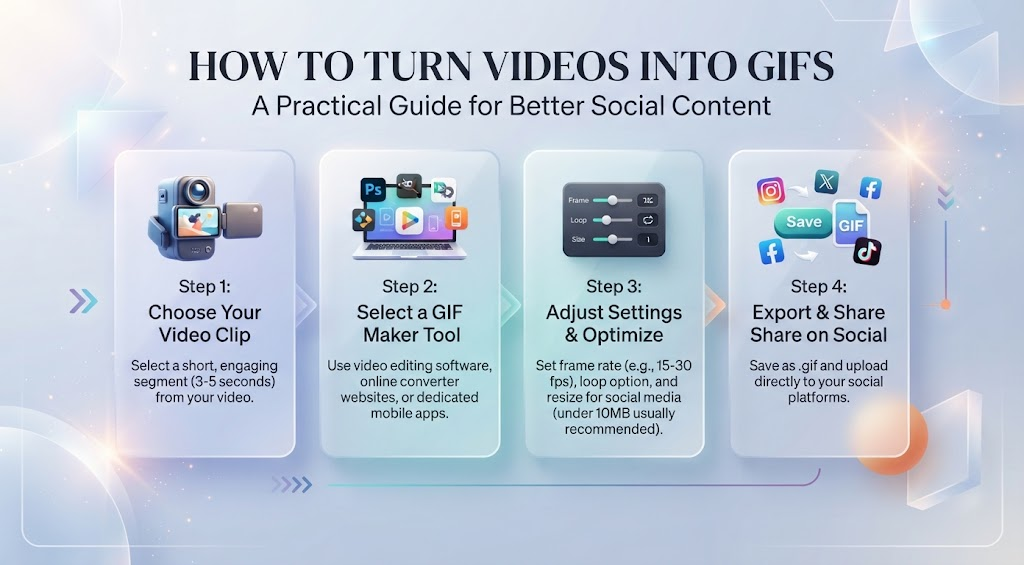
Video is everywhere, but that does not always mean it is the best format for sharing a quick idea. Sometimes a five-second reaction, product demonstration, funny moment, or useful visual works better as a looping GIF. GIFs are lightweight, easy to share, and instantly understandable without requiring someone to press play.
That makes them surprisingly useful for marketers, bloggers, social media managers, educators, and everyday creators. A well-chosen GIF can explain something faster than a paragraph of text, add personality to a post, or turn an ordinary video clip into something people actually stop scrolling to watch.
If you already have footage worth sharing, a video to GIF converter can make the process much simpler. Instead of learning complicated editing software, you can transform a short section of video into a shareable looping animation and use it across websites, presentations, emails, or social content.
Why GIFs Still Matter
GIFs have been around for decades, but they remain useful because they sit somewhere between an image and a video.
Unlike a still image, a GIF can show movement. Unlike a traditional video, it can often play automatically and loop continuously without asking the viewer to interact with it.
That difference matters online.
Imagine you are writing a tutorial about a software feature. A screenshot can show where a button is located, but a short animated clip can demonstrate exactly what happens when someone clicks it. The reader does not have to imagine the process or open another video.
The same principle works for ecommerce. A clothing brand could use a short GIF to demonstrate how a jacket moves, while a beauty company might show the application of a product. Small movements can communicate details that static photography simply cannot.
Choose the Right Video Clip
The quality of the final GIF depends heavily on the footage you start with.
You do not need a long video. In fact, shorter clips are usually more effective. Look for a moment that communicates one clear idea.
Good candidates include:
- A funny reaction
- A product demonstration
- A before-and-after transformation
- A simple tutorial step
- A memorable movie or interview moment
- A short animation
- A visual transition
- A quick movement or gesture
Avoid choosing a clip simply because it looks interesting. Ask yourself what the viewer is supposed to notice.
If the answer is unclear, trim the footage until the purpose becomes obvious.
Keep the GIF Short and Focused
One of the most common mistakes is trying to turn too much video into one GIF.
A GIF containing thirty seconds of footage can quickly become unnecessarily large and difficult to load. It can also lose the immediacy that makes the format useful in the first place.
For most purposes, aim for a brief moment that loops naturally. Sometimes three or four seconds is enough.
Think of a GIF as a visual sentence. It should communicate one thought rather than tell an entire story.
For example, if you are demonstrating how a mobile app works, you might create separate GIFs for opening a menu, changing a setting, and completing an action instead of squeezing the entire tutorial into one file.
Make the Loop Feel Natural
A good loop is easy to watch repeatedly because the transition from the final frame back to the first does not feel jarring.
When selecting your footage, look for moments where the movement naturally repeats. Someone waving, a rotating object, a bouncing animation, or a simple transition can often create a smoother loop than a clip with a clear beginning and ending.
If the clip does not naturally loop, you can sometimes improve it by choosing a different starting point or trimming a few frames from either end.
This small detail can make a surprisingly large difference.
Think About Where the GIF Will Be Used
Before creating your GIF, consider its destination.
A GIF intended for a blog post has different requirements from one designed for a social media post or email newsletter. The available space, expected loading speed, and audience behavior all matter.
For websites, prioritize reasonable file sizes so the animation does not slow down the page.
For email, remember that some email clients may handle animated content differently. Keep the most important information in the first frame so the message still makes sense if animation is unavailable.
For social media, focus on the first moment. Users scroll quickly, so the opening frame should give them a reason to keep watching.
Use GIFs to Explain, Not Just Entertain
GIFs are often associated with memes and reaction images, but their practical value goes much further.
Customer support teams can use them to answer recurring questions. Instead of repeatedly explaining where to find a setting, a short animation can show the process visually.
Content marketers can use GIFs to make statistics, product features, or tutorials more engaging.
Designers can use them to demonstrate interactions and prototypes.
Teachers can use them to illustrate processes that are difficult to explain through static diagrams.
Even internal business documentation can benefit from short animations. If employees frequently ask how to complete a particular task, a concise GIF can serve as a visual reference that is faster to understand than several paragraphs of instructions.
Pay Attention to File Size
GIFs are convenient, but they are not always the most efficient image format.
Because GIFs store animation frame by frame and have technical limitations, large or high-resolution animations can become surprisingly heavy. This is especially important when creating content for websites.
Keep dimensions appropriate for the intended placement and avoid using unnecessary footage.
If the original video is extremely large, there is usually no reason for the resulting GIF to retain those dimensions. A small animation embedded in a blog article rarely needs to be the same resolution as the original video.
The goal is to find the right balance between visual quality and practical file size.
Add Context When Necessary
Not every GIF explains itself.
If the animation is part of an article, introduce it with a sentence that tells readers what they are looking at. A short caption can also make the purpose clearer.
For example, instead of simply placing an animation underneath a heading, explain what the reader should notice: “This three-second clip shows where to find the export option.”
That tiny bit of context can turn a decorative animation into a useful teaching tool.
Get More Value From Existing Video
One of the biggest advantages of working with GIFs is that you can repurpose footage you already have.
A single product video might contain several moments worth turning into standalone visual assets. An interview could provide a memorable reaction. A webinar could contain short demonstrations that work well inside a longer article.
This gives existing content a second life.
Rather than constantly creating something new, look through your existing video library and identify moments that could be useful in other formats. Repurposing content this way can save time while keeping your website, social channels, and marketing materials visually active.
Final Thoughts
GIFs work best when they have a clear purpose. Whether you are explaining a process, highlighting a product feature, adding personality to an article, or making educational content easier to understand, a short animation can communicate an idea quickly and naturally.
Start with strong footage, keep the clip focused, optimize the file for its intended use, and make sure the animation adds genuine value. With those basics in place, turning existing video into useful visual content becomes a simple part of your broader content strategy.


Leave a Reply